Responsive Pricing Explained: Plans, Costs, Limits, and Alternatives for 2026

Article written by
Aparna Rajendran

INSIDE THE ARTICLE
SHARE THIS ARTICLE
Summary
Responsive keeps pricing behind a sales call, but teams consistently report one thing: it gets expensive faster with the number of features. This breakdown covers what you’re really paying for and why many fast-moving sales and pre-sales teams eventually turn to secure, AI-native alternatives like SparrowGenie for faster drafting, cleaner knowledge, and more predictable costs.
There’s a pattern you’ll notice when evaluating enterprise RFP software: the features look clear, but the pricing rarely does. Responsive (formerly RFPIO) fits that pattern closely. While the platform clearly outlines its editions and intended use cases, it does not publish fixed pricing on its website. Instead, costs are determined through a sales-led process and vary based on how the platform is deployed.
If you’re budgeting for 2026 or mapping the right tech stack for your RFP operations, it helps to understand how Responsive structures its pricing and what actually influences the final quote. The goal here is simple: give teams an honest, structured view of what drives Responsive’s costs so there are no surprises later.
Understanding Responsive.io Pricing Model
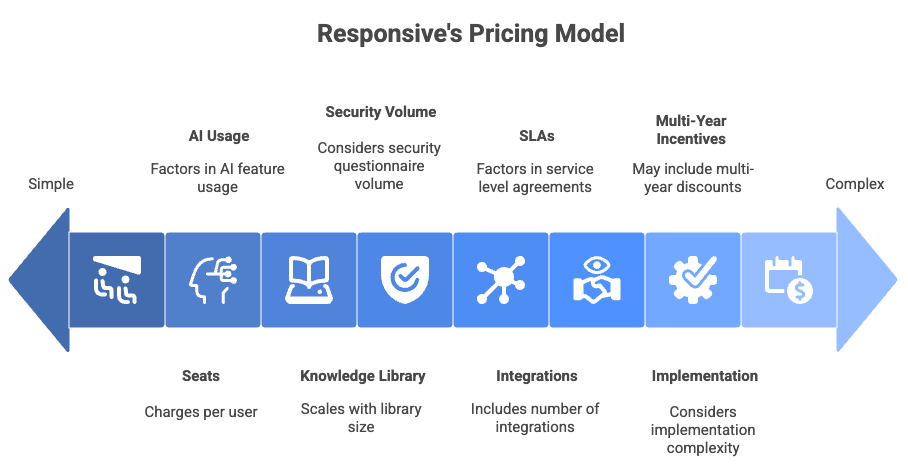
Responsive does not follow a flat, self-serve pricing model. Instead, pricing is tied to a combination of the edition you choose and how deeply the proposal platform is used across your organization.
Based on how Responsive positions its Lite, Emerging, Growth, and Enterprise editions, pricing is influenced by factors such as
- Number and type of users (Authors, Contributors, Reviewers)
- AI usage and automation depth
- Size and complexity of the response knowledge library
- Volume of RFPs and security questionnaires handled
- Integrations (CRM, collaboration, storage, APIs)
- Workflow complexity and approval layers
- Security, compliance, and SLA requirements
- Implementation scope and onboarding services
This is why two companies with similar headcounts can receive very different quotes. Responsive pricing is not just about RFP volume. It reflects how embedded the platform becomes within sales, pre-sales, legal, InfoSec, and compliance workflows.
As a result, Responsive typically aligns best with mid-market and enterprise teams running frequent RFx cycles with layered reviews and governance needs. Smaller teams often find that costs and onboarding effort scale faster than expected as usage grows.
Once you understand these pricing levers, the edition structure becomes much easier to evaluate.
How Much Responsive Costs in 2026
Responsive does not disclose public pricing. As a result, most teams rely on third-party reviews, analyst discussions, and procurement benchmarks to estimate real-world spend.
Across multiple sources across the internet, the pattern looks like this:
- Entry-level deployments often start in the high four figures to low five figures annually
- Costs increase significantly as teams move into multi-department workflows, advanced AI usage, integrations, and enterprise governance
Pricing typically increases when teams add:
- API access
- Security questionnaire automation
- CRM and collaboration integrations
- Large-scale content libraries
- Dedicated onboarding and migration services
- Enterprise-grade SLAs and support
For context, once RFP workflows span sales, legal, InfoSec, and product teams, the overall cost curve rises quickly. This reflects the platform’s focus on governance-heavy operations rather than lightweight proposal workflows.
Responsive Pricing Plans: Full Analysis
Let’s walk deeper through each of Responsive's pricing plans. Not just what’s included, but why it matters and who actually benefits.
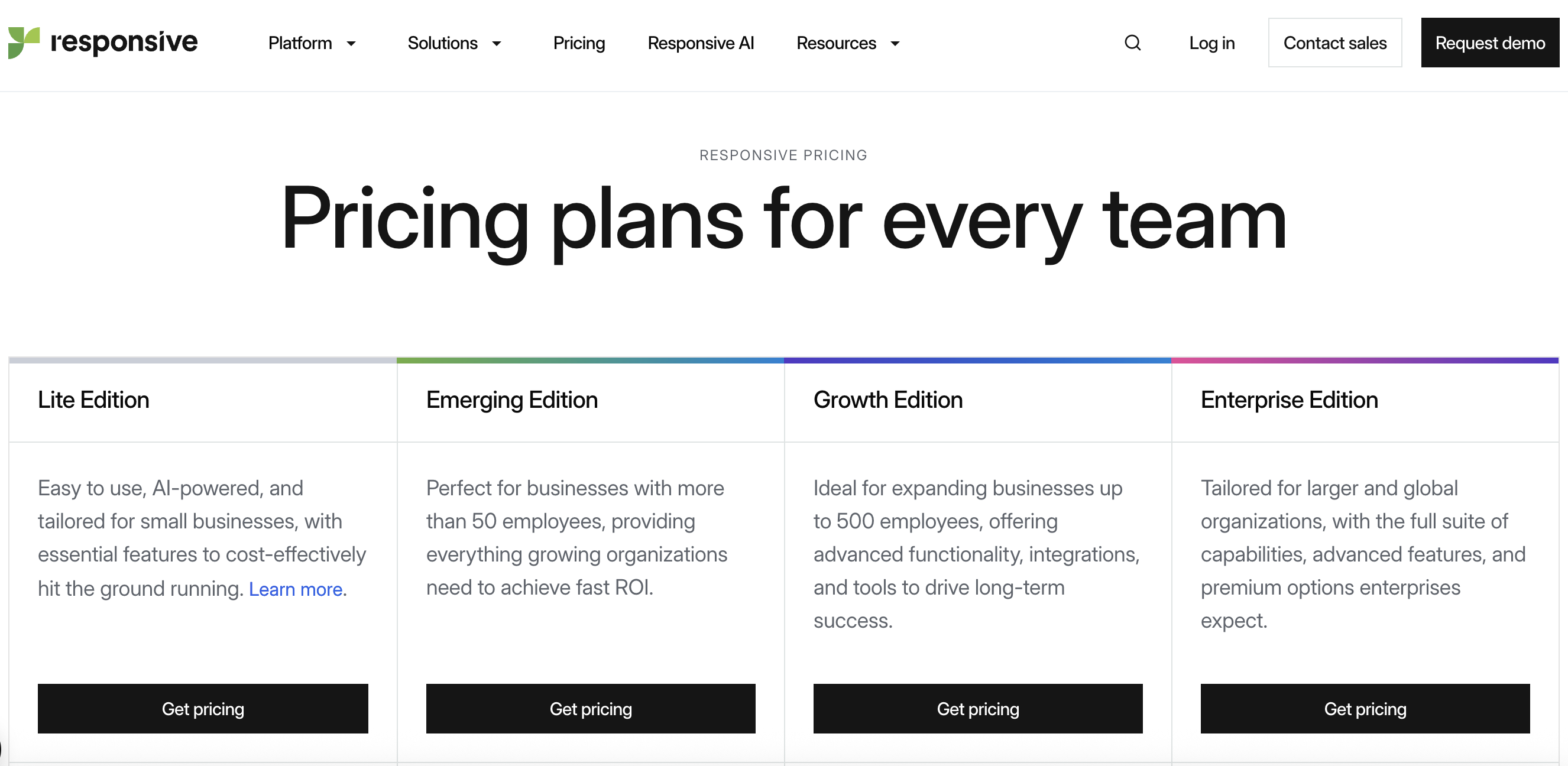
Source: Responsive
1. Lite Edition: For Early-Stage Proposal Operations
Teams often start here because it feels approachable. It is built for organizations that are still formalizing their RFP process and don’t need heavy governance yet.
What you actually get:
- Core Response Library
- Auto-answering based on past responses
- Import/export support
- Basic workflow automation
- Collaboration tools to gather SME input
- Foundational analytics
This plan gives you a structure to work from without overwhelming your team. It’s enough to handle simple RFP cycles, organize content, and speed up first drafts.
Where it falls short:
The missing pieces become obvious once RFP volume increases:
- No Salesforce integration
- No Slack/Teams collaboration
- Limited governance
- No API access
- No advanced AI scoring or recommendation engine
- No dedicated security questionnaire tools
Teams often upgrade because they realize their sales and pre-sales workflows happen across multiple tools, not inside the RFP software alone.
Who this plan really suits: Small teams dipping their toes into formal RFP management or companies handling low volume.
Pricing reality:
It’s a solid starting point, but not a long-term home for most SaaS sales orgs.
2. Emerging Edition: The Operational Sweet Spot
This is where most Responsive customers land. This plan adds the features that modern SaaS sales teams expect: integrations, deeper workflows, and smarter content automation.
What you get beyond Essentials:
- Salesforce integration (critical for RevOps visibility)
- Slack and Microsoft Teams collaboration
- Answer recommendation engine
- Stronger governance and permissions
- Storage integrations (Drive, SharePoint, Box)
- Multi-project tracking
- Analytics dashboards
This plan finally connects the dots across sales, pre-sales, and product. It removes a lot of manual coordination and gives managers visibility into bottlenecks.
What you may still miss:
- Enterprise-level compliance controls
- Complex workflow layering
- Custom approval routing
- High-volume security questionnaire automation
- API-driven automations
Teams with strict InfoSec demands or global operations will eventually feel these limitations.
Who this plan fits: Mid-size SaaS teams handling weekly RFPs and cross-functional reviews.
Pricing reality:
Professional is the most practical plan for growth-stage teams, but the cost grows quickly with additional seats and onboarding.
3. Growth Edition: Built for Scale and Compliance
Once your RFP process involves multiple regions, complex products, or tight security reviews, governance becomes the priority. It is designed for exactly that.
What you gain at this level:
- API access for automation and integrations
- Single Sign-On (SSO)
- Complete audit trails
- Customizable, multi-layered workflows
- Advanced reporting and analytics
- Security questionnaire automation
- Larger library capacity
- Priority support and dedicated account management
This plan is about eliminating friction and risk.
You don’t just move faster; you move with higher accuracy and compliance.
What still costs extra:
- Large-scale onboarding
- Multi-system library migration
- Custom API workflows
- Premium SLAs
Who chooses this: Large enterprises or companies with heavy InfoSec involvement in every deal cycle.
Pricing reality:
Enterprise becomes cost-effective only when your RFP volume and internal complexity justify the investment.
4. Enterprise Edition: Optimized for High-Volume Global Operations
This is Responsive’s top tier and leans heavily into advanced AI and enterprise control.It’s less about “doing RFPs” and more about orchestrating a global RFx machine.
What it includes:
- Full AI suite
- Predictive & suggested answers
- Cross-department workflow automation
- Enterprise governance
- Dedicated onboarding & support
- Highest-grade SLAs
- Advanced content governance
- Scalability for thousands of responses across teams
This plan is designed for organizations where RFPs, RFIs, DDQs, and security questionnaires flow in nonstop and where coordinated responses affect tens or hundreds of millions in pipeline.
Who it suits: Global companies with formal proposal centers of excellence (COEs).
Pricing reality:
You only invest at this level when speed, scale, and accuracy directly tie to revenue operations.
Hidden Responsive Costs to Know
Responsive’s platform is robust, but that also means the pricing expands with usage.
Because pricing is usage-driven, total cost often extends beyond the initial quote:
- Implementation fees: Often range from several thousand dollars upward depending on migration complexity
- Additional users: Contributor and reviewer seats add up quickly
- AI usage limits: Lower tiers can hit caps faster than expected
- Library migration: Bulk ingestion from legacy systems may require professional services
- Advanced integrations: API and custom syncs increase costs
- Premium support: Typically reserved for higher tiers
Many teams report total first-year spending ending up 30–40% higher than initial expectations once these factors are included.
What Users Say: Real Feedback on Responsive’s Experience
User feedback across Capterra and Info-Tech paints a consistent picture: Responsive is powerful, but the experience isn’t always as smooth as teams expect. Here’s a breakdown of the most common themes, supported by real user comments.
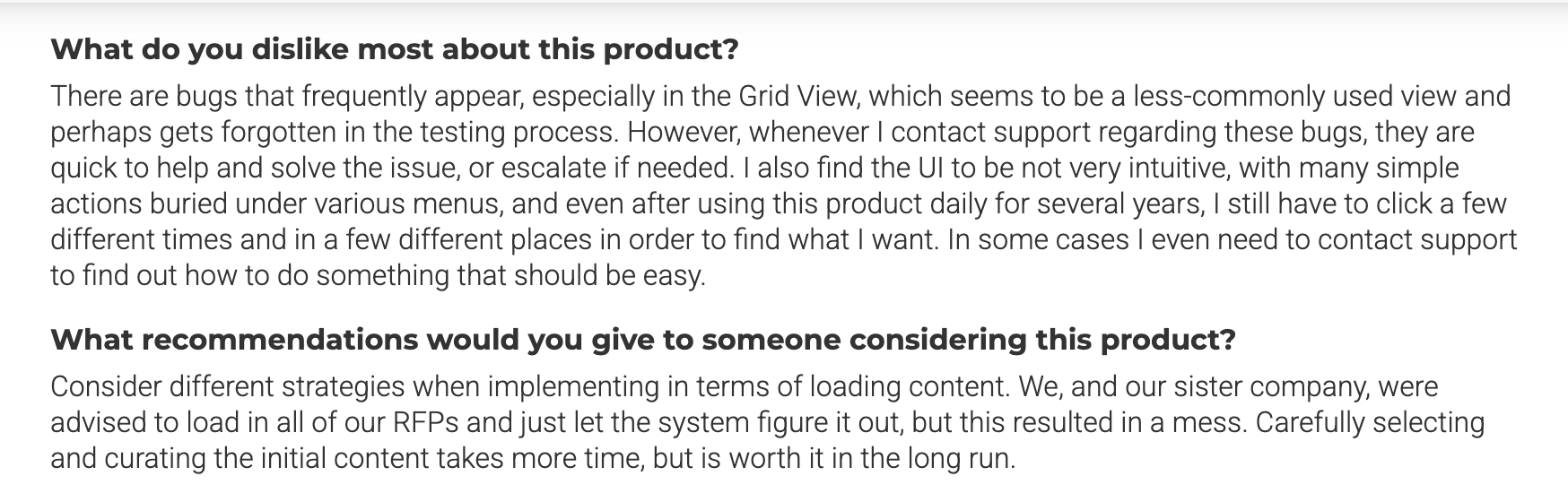
Bugs & UI Complexity
Main insights:
- Frequent bugs, especially in Grid View, make the tool feel unreliable at times.
- UI is not intuitive; simple actions are buried in menus, requiring multiple clicks.
- Even long-term users struggle to locate features quickly.
- The reviewer often has to contact support for tasks that should be easy.
- Support response is positive, but dependence on it is high.
Summary:
A powerful platform, but ongoing bugs and a complex UI make the daily workflow harder than expected.
Feature Clashes & Glitches

Main insights:
- Notes that the tool occasionally suffers from bugs and code clashes due to having many features.
- Appreciates that support is quick and responsive but wishes bugs weren’t so common.
Summary:
Responsive offers rich functionality, but the depth sometimes introduces instability.
UX & Adoption Challenges

Main insights:
- Criticizes the user experience as a whole.
- Mentions that tech adoption takes longer, suggesting a steeper learning curve.
Summary:
The reviewer finds the tool functional but not user-friendly, slowing down team adoption.
Auto-Reply Doesn’t Work as Expected

Main insights:
- Reviewer states that the auto-reply feature “never really worked.”
- Frustration is higher because auto-reply is supposed to be one of the core selling points.
Summary:
One of the platform’s headline features underdelivers for this user, reducing expected efficiency gains.
Licensing & Slow Search Performance

Main insights:
- Points out high licensing costs as a drawback.
- Notes slow response times when pasting text into search fields.
- Performance lag directly affects productivity during RFP work.
Summary:
The reviewer feels the cost is high relative to the system’s search speed and overall responsiveness.
Overall User Sentiment (Across All Reviews)
Users value Responsive’s capabilities and strong support team but consistently highlight bugs, UI friction, slower workflows, feature instability, and premium pricing as common challenges. The platform performs well when teams have time and structure, but it can feel heavy for fast-moving sales and pre-sales orgs.
Responsive vs Competitors: Pricing, Features, UX, and AI
Evaluating proposal software isn’t about checking boxes; it’s about finding the platform that actually works for your team’s pace, process, and people.
Let’s compare how Responsive stacks up against a few other major players in 2026: Loopio, Qvidian, RocketDocs, and SparrowGenie. We’ll break it down across four dimensions that matter most: Pricing, Features, User Experience, and AI Capabilities.
1. Pricing
Platform | Typical Pricing (Annual) | Notes |
|---|---|---|
Responsive | Custom quote | Flexible tiers, but cost scales fast with seats + AI use |
Loopio | Starts from $20K | Higher per-user pricing; strong onboarding support included |
Qvidian | Custom quote | Premium pricing; add-ons for AI, training, support |
RocketDocs | Custom quote | Known for budget-flexible plans & unlimited SME collaborators |
SparrowGenie | Starts from $899 | Built for affordability; AI power without enterprise markup |
Summary:
Every player hides exact numbers behind a sales call, but Responsive, Qvidian, and Loopio skew high, especially once you start adding seats, integrations, and AI usage. SparrowGenie and RocketDocs offer more flexibility and friendlier starting points.
2. Features
Platform | Core Strengths | Gaps |
|---|---|---|
Responsive | End-to-end proposal workflow, strong integrations, security questionnaire handling, TRACE Score™ | Steep setup, requires ongoing maintenance |
Loopio | Answer Library, intuitive collaboration, smart auto-suggest, content governance | Limited to response use case; no issuing/scoring |
Qvidian | Complex doc automation, template logic, Office integration | Dated UX, clunky collaboration, basic AI |
RocketDocs | Office-native workflows, RapidDocs templates, role flexibility, free SME access | Requires upfront customization, basic analytics |
SparrowGenie | AI-native response generation, auto-drafting, unified Knowledge Hub, secure collaboration | Still adding advanced reporting; e-sign not yet built-in |
Summary:
If you need structured control and legacy formatting, Qvidian and RocketDocs shine. Responsive covers the full workflow but can overwhelm. SparrowGenie and Loopio offer modern simplicity with AI doing more of the heavy lifting.
3. User Experience
Platform | Ease of Use | Learning Curve |
|---|---|---|
Responsive | Powerful, but dense | High – needs onboarding and training |
Loopio | Intuitive, clean UI | Low – up and running quickly |
Qvidian | Functional, dated | High – not built for casual users |
RocketDocs | Familiar via Office | Medium – setup flexibility = setup time |
SparrowGenie | Clean, AI-guided UX | Low – teams love how fast they can start working |
Summary:
Loopio and SparrowGenie lead on simplicity. Responsive and Qvidian require more training, especially for non-technical users. RocketDocs wins points for keeping things familiar inside Word and Excel.
4. AI Capabilities
Platform | AI Highlights | AI Philosophy |
|---|---|---|
Responsive | Auto-fill, generative agents, requirement analysis | AI-enhanced (but still library-first) |
Loopio | Generative answers, trusted content sourcing, learning engine | AI that amplifies human knowledge |
Qvidian | AI Assist for suggestions | Late to AI, still catching up |
RocketDocs | Hybrid AI (autofill + secure GPT), content-first | Pragmatic AI woven into proven workflows |
SparrowGenie | Auto-drafting, AI-based Q&A scoring, secure AI chat assistant | AI-native from the ground up |
Summary:
SparrowGenie leads in speed and automation thanks to its AI-native design. Loopio blends smart generative features with control. Responsive sits in the middle - powerful, but not always intuitive. Qvidian lag in depth.
The Bottom Line
When you strip away the noise, each RFP tool has a clear sweet spot and a few trade-offs you should keep in mind. Responsive suits large enterprises that live in complex approval chains, though its cost and complexity escalate fast. Loopio is a solid fit for mid-size teams that value smooth onboarding and dependable support, but its per-user pricing adds up. Qvidian appeals to legacy-heavy companies with strict templates, but its UX is dated and AI capabilities are limited. RocketDocs gives flexible teams the comfort of deep Microsoft integration plus modern AI, but you may need guidance to unlock its full power. And SparrowGenie is ideal for fast-moving SaaS teams that want AI doing the heavy lifting, with the only watch-out being that some advanced reporting and enterprise integrations are still evolving.
Pros and Cons of Investing in Responsive
Here's a quick check on the pros and cons of investing in Responsive:
Pros
- Strong for global teams
- Deep, customizable workflows
- Mature integrations
- Serious enterprise governance
- Security controls fit strict procurement standards
Cons
- No transparent pricing
- Costs rise quickly with seats, SLAs, and modules
- Onboarding can be heavy
- Requires ongoing library governance
- AI feels layered-on, not foundational
This is why Responsive excels in structured environments but can feel overwhelming for leaner teams.
Is Responsive Worth the Cost?
Responsive is worth the investment if your organization:
- Runs high volumes of complex RFPs
- Requires strict compliance and audit controls
- Operates across multiple regions
- Has dedicated proposal or RevOps specialists
- Needs granular workflow and approval routing
It becomes less ideal when the goal is agility, AI-first speed, or a lower maintenance burden. Teams with smaller proposal ops or early-stage pre-sales orgs often outgrow Responsive before justifying the cost.
Why SparrowGenie Is the Best Alternative to Responsive
If your team wants an RFP platform designed for speed, clarity, and modern AI workflows, SparrowGenie stands out as a strong alternative to Responsive. It offers the same enterprise-level capabilities teams rely on, just delivered through a cleaner experience, smarter automation, and a pricing model built for growth rather than restriction.
Top 5 Reasons SparrowGenie Is a Better Fit for Many Teams
- AI That Builds First Drafts Automatically
SparrowGenie generates full, high-quality drafts with confidence scores and requirement checks, helping teams move straight to refinement rather than manual assembly. - Exceptional Performance on Security Questionnaires
InfoSec-heavy sections become dramatically easier thanks to AI that understands intent, identifies risk areas, and accelerates turnaround times. - Intuitive, Fast User Experience
Genie’s clean interface eliminates workflow fatigue. Teams onboard quickly, contribute easily, and collaborate without friction. - Predictable, Growth-Friendly Pricing
SparrowGenie avoids the seat-based cost jumps and AI overage surprises. Pricing stays clearer, more scalable, and easier to justify to leadership. - AI-Native Knowledge Hub That Improves Over Time
Genie keeps content fresh automatically, learning from edits, preventing duplicates, and maintaining answer accuracy without manual maintenance.
For organizations that want modern AI, faster proposal cycles, and a smoother day-to-day experience, SparrowGenie isn’t just an alternative to Responsive; it’s a forward-looking upgrade.
Final Thoughts
Responsive’s pricing structure reflects a broader truth about the RFP landscape: most teams aren’t struggling because the work is hard; they’re struggling because the volume, complexity, and compliance requirements have outgrown traditional workflows. Responsive brings order and governance, but it was built for a world where teams had the time and headcount to manage large libraries, layered approvals, and manual upkeep. Today’s sales cycles move faster, security questionnaires take longer, and proposal teams need AI that doesn’t just streamline tasks but materially reduces the workload.
That’s where SparrowGenie becomes a compelling alternative. Instead of optimizing old processes, Genie redefines them using secure AI to draft responses, maintain content, accelerate InfoSec-heavy sections, and give smaller teams the output of much larger ones. It’s easier to adopt, more predictable to budget for, and built for the pace revenue teams are operating at right now. If Responsive helps you manage the process, SparrowGenie helps you win it, and that difference is what will shape how teams compete in 2026 and beyond.
Ready to see how AI can transform your RFP process?
Product Marketer at SparrowGenie
Being a Product Marketer at SparrowGenie, Aparna helps sales teams work faster with secure, AI-powered proposal automation. She turns complex features into simple stories, builds messaging that resonates, and keeps a close pulse on what customers actually need. She loves shaping clear, helpful content that shows how SparrowGenie makes RFP work easier, faster, and a lot less stressful.